This post contains affiliate links, which means that if you click on one of the product links and make a purchase, I may earn a small commission at no extra cost to you. As an Amazon Associate, I earn from qualifying purchases. All opinions are my own, and I only recommend products that I believe provide value to my readers.
Welcome to SafenestIQ! – AS AN AMAZON ASSOCIATE I EARN FROM QUALIFYING PURCHASES
In today’s tech-savvy world, smart locks are becoming an essential part of home security. With the convenience of WiFi connectivity, these devices offer seamless access control and peace of mind. In this post, I’ll share the top 5 WiFi smart locks that stand out for their innovative features, reliability, and user-friendliness. Whether you’re looking to upgrade your home security or simply want to streamline your entry, these locks are worth considering. Let’s dive in!
I may earn from qualifying purchases at no extra cost to you.
8.7
Highly recommended!
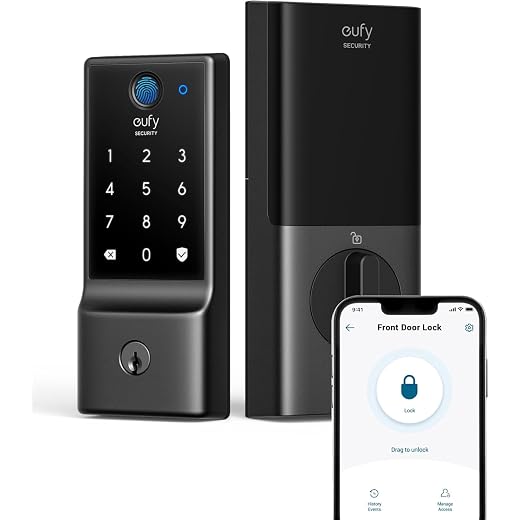
I recently installed the eufy Smart Lock C30, and I love the convenience of keyless entry and the built-in Wi-Fi that lets me control it remotely without needing a bridge. While the installation was mostly straightforward, I did encounter some minor confusion with the instructions, but overall, it offers a sleek design and robust security features that give me peace of mind!
Benefits
Keyless entry for convenience
Built-in WiFi, no bridge required
Easy installation process
App remote control and real-time notifications
Sleek and modern design
Unique user codes for family and guests
Simple battery replacement process
CONS
Potential connectivity issues with the app, leading to temporary functionality loss
Installation instructions may lack clarity, causing some confusion
The eufy Smart Lock C30 has truly transformed the way I secure my home. With built-in Wi-Fi and no need for a bridge, I can lock and unlock my front door right from the eufy Security app, no matter where I am. I love being able to check the lock status while I’m cozied up in bed or away from home, giving me peace of mind at all times.
Installation was a breeze, taking just about 15 minutes and requiring no special tools. The durable physical buttons are a fantastic feature, providing reliability without the issues that touchscreens can sometimes have. Plus, I appreciate the ability to create unique access codes for family and friends, making it easy to manage who can enter my home. Overall, I couldn’t be happier with this smart lock!
Smart Security at Your Fingertips
Keyless Entry Options: Open your door using a physical key, voice commands, or a physical button for enhanced durability
Built-in Wi-Fi: Control your lock remotely without needing a bridge, using the eufy Security app
Auto Lock Functionality: Automatically secures your door based on your settings, providing peace of mind
Easy DIY Installation: Quick installation in about 15 minutes, compatible with most standard deadbolts, and requires no drilling
Robust Security Features: Low battery indicator, extreme temperature resistance, and wrong-try protection to deter unauthorized access
Integrated Smart Home Compatibility: Seamlessly pair with other eufy devices for a cohesive smart home experience
✯ Highly recommended! ✯
Eufy Smart Lock C30, Keyless Entry
$79.99
in stock
Amazon price updated: July 14, 2026 6:29 am
I may earn from qualifying purchases at no extra cost to you.
I may earn from qualifying purchases at no extra cost to you.
8.4
Convenient and reliable
I recently installed the eufy Security Smart Lock C210, and I love the convenience of its keyless entry options and built-in Wi-Fi for easy remote control. While the installation was a breeze and the touchscreen is user-friendly, I did notice a loose turn knob that slightly affects usability, but overall, it’s a sturdy and reliable lock that integrates well with my smart home devices!
PROS
5-in-1 Keyless Entry Options
Built-in WiFi for direct connection
No additional bridge or hub required
Easy DIY installation
User-friendly touchscreen keypad
Remote control via mobile app
Durable and high-quality construction
Drawbacks
Loose turn knob may affect user experience
Hold to confirm” locking feature can be inconvenient
I recently installed the eufy Security Smart Lock C210, and I couldn’t be happier with how it enhances my home security. This smart lock offers a seamless blend of technology and convenience, featuring a built-in WiFi that eliminates the need for a bridge, allowing me to control the lock from anywhere using the eufy Security app. The installation process was straightforward and took me just 15 minutes, making it perfect for anyone, even those not particularly handy.
What I truly love about the C210 is its versatility in unlocking options. I can choose to enter via the touchscreen keypad, use the app, or even rely on voice commands with my smart assistants. The security it provides is top-notch, and I feel reassured knowing it has been certified for durability, ready to withstand daily use. Whether I’m at home or away, this smart lock gives me peace of mind and makes managing access to my home incredibly easy!
Convenient Keyless Access Solutions
Keyless Entry with Multiple Unlocking Options
Built-in Wi-Fi for Remote Control
Easy Installation Without Drilling
Integration with Smart Home Devices
High Security and Durability Certification
24/7 Customer Support and Aftersales Service
Convenient and reliable
Eufy Smart Lock C210 - Keyless Entry
I may earn from qualifying purchases at no extra cost to you.
I may earn from qualifying purchases at no extra cost to you.
8.4
Solid choice!
I recently tried the eufy Security Smart Lock C220, and I love its easy installation and multiple unlocking methods, including a responsive fingerprint sensor and app control. While the fingerprint recognition can be a bit inconsistent for some, the overall durability and reliable battery life make it a solid choice for enhancing my home security!
Pluses
Easy installation process
Multiple unlocking methods (fingerprint, keypad, app, traditional key)
Responsive fingerprint sensor
Built-in Wi-Fi for remote control and monitoring
Durable design with reliable battery life
Compatible with other Eufy devices (e.g., doorbell camera)
Good customer service support
CONS
Fingerprint recognition can be inconsistent for some users
The need to press the enter key after entering a code may confuse unfamiliar users
I recently got my hands on the eufy Security Smart Lock C220, and I couldn’t be happier with it! The installation was a breeze, taking me just about 15 minutes, and I love how sleek and modern it looks on my front door. With eight AA batteries, I can enjoy an impressive battery life of up to eight months, giving me peace of mind without having to worry about frequent replacements.
What really impresses me about this smart lock is its versatility. I can unlock it using my fingerprint, keypad, or even the eufy Security app from anywhere, plus it works seamlessly with Alexa and Google Voice Assistant. The self-learning AI makes accessing my home quick and easy, and I appreciate the added security features like real-time notifications and event history. Overall, the eufy C220 has truly transformed my home security experience!
Unlock Convenience and Security
8 Months Battery Life
Self-learning AI Fingerprint Recognition
6 Unlocking Methods
Built-in Wi-Fi for Remote Control
Easy Installation
Enhanced Security and Durability
Solid choice!
Eufy Smart Lock C220, Keyless Entry
$99.99
in stock
Amazon price updated: July 14, 2026 6:29 am
I may earn from qualifying purchases at no extra cost to you.
I may earn from qualifying purchases at no extra cost to you.
7.8
Highly recommended!
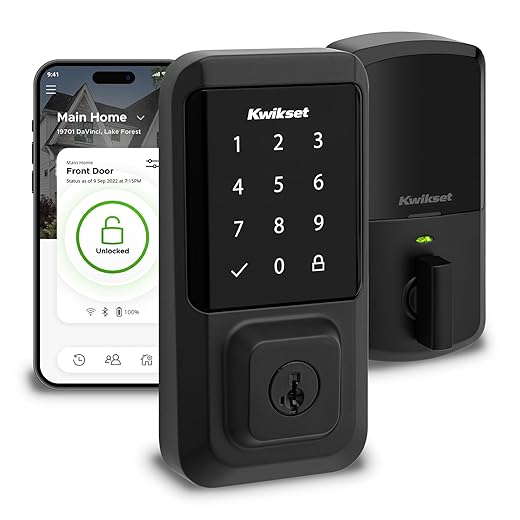
The Kwikset Halo Wi-Fi Smart Lock offers easy installation and seamless remote control through its app, allowing me to manage up to 250 access codes for guests effortlessly. With its sleek design, smart home compatibility, and handy features like intrusion detection alerts and auto-lock functionality, it makes my home both secure and convenient, though I do wish the battery life was a bit longer!
Pluses
Easy installation without the need for a hub
Wi-Fi connectivity allows remote control from anywhere
Touchscreen interface for keyless entry
Ability to generate temporary access codes for guests
Compatible with smart home systems like Alexa and Google Home
Sleek matte black finish enhances aesthetic appeal
SmartKey Re-Key Security for added convenience and security
CONS
Battery life can deplete quickly, requiring frequent replacements
App compatibility issues in certain regions may limit functionality
I absolutely love my Kwikset Halo Wi-Fi Smart Lock! Its sleek matte black finish complements my front door beautifully, while the touchscreen makes keyless entry a breeze. With the Kwikset app, I can lock and unlock my door from anywhere, which is perfect for those days when I forget if I locked up. Plus, sharing access codes with family and friends is super easy, and I get real-time notifications whenever someone comes and goes.
Installation was a cinch—I just needed a screwdriver, and I was up and running in no time. The auto-lock feature gives me peace of mind, ensuring my home is secure even if I’m in a hurry. Overall, this smart lock has made my life so much easier, and I can’t recommend it enough for anyone looking to enhance their home security!
Smart Security at Your Fingertips
Wi-Fi Enabled Control: Lock and unlock remotely via the Kwikset app without the need for a hub
Multiple Access Codes: Supports up to 250 keyless entry codes for easy guest access
Smart Home Compatibility: Works seamlessly with Amazon Alexa and Google Home for voice control
Intrusion Detection Alerts: Receive instant notifications for unusual lock activity
Auto-Lock Functionality: Set automatic locking after entry or exit for enhanced security
Easy DIY Installation: Quick installation with just a screwdriver, fitting various door thicknesses
Kwikset Halo Wi-Fi Smart Lock
I may earn from qualifying purchases at no extra cost to you.
I may earn from qualifying purchases at no extra cost to you.
7.8
Highly recommended!
I really love the August Home Smart Keyless Entry Door Lock! Its easy installation over my existing deadbolt and compatibility with voice assistants make it super convenient. The auto-lock feature adds an extra layer of security, although I’ve noticed some occasional battery life and connectivity issues. Overall, it’s a stylish and functional addition to my home!
Pros
Easy installation using existing deadbolt
Remote access and control via smartphone app
Ability to share access with guests
Auto-lock feature for added security
Activity log to track door usage
Compatible with smart home systems like Google Home and Alexa
Maintains traditional appearance of the door lock
Drawbacks
Inconsistent battery life and notifications about low battery
Occasional connectivity issues with Wi-Fi and Bluetooth, leading to delays in unlocking
I recently installed the August Home Wi-Fi Connected Smart Lock, and I’m genuinely impressed with how seamlessly it integrates into my home. The installation took just about 10 minutes, fitting perfectly over my existing deadbolt without altering the exterior look of my door. I love that I can remotely lock and unlock my door using the app, which also lets me monitor who enters and exits my home.
One of my favorite features is the Auto-Lock function, which ensures my door is securely locked if I forget. However, I’ve noticed from some reviews that battery life can be a concern, and I plan to invest in some quality rechargeable batteries to keep things running smoothly. Overall, this smart lock has provided me with convenience and peace of mind, and I can’t imagine going back to a traditional lock!
Keyless Convenience at Your Door
Smart Integration: Compatible with popular voice assistants like Amazon Alexa, Google Assistant, and Apple HomeKit
Easy Installation: Installs in minutes over existing deadbolts without requiring professional help
Remote Access Control: Share permanent, scheduled, or temporary access easily through the August app
Auto-Lock/Unlock Functionality: Automatically locks and unlocks the door as you approach or after closing
Maintains Curb Appeal: Installs on the inside of the door, preserving the exterior design of your home
Optional Keypad Access: Connects to a Smart Keypad for code-based entry, perfect for guests or service providers
August Smart Keyless Entry Door Lock
$174.99
in stock
Amazon price updated: July 14, 2026 6:29 am
I may earn from qualifying purchases at no extra cost to you.
Oliver is the founder of Safenestiq.com and an expert in home security technology. With years of experience researching smart devices, Oliver offers unbiased reviews and practical advice to help homeowners stay safe and secure.
news via inbox
Stay updated with the latest tips and offers. Subscribe to our newsletter today!
Absolutely! Most of the locks mentioned, including the Eufy models and Kwikset Halo, offer integration with those systems. I’ll try to highlight that in future posts!
For first-time buyers, I’d recommend the Eufy Smart Lock C210. It’s user-friendly and has straightforward installation instructions. Perfect for beginners!
Great question! While the upfront cost is higher, the convenience and added security often justify the investment. Plus, they can save you money on locksmith fees in the long run!
Absolutely! The Kwikset Halo offers robust security features, including a built-in alarm and smart key technology. I’ll try to expand on that in future updates!
I’ve had the Eufy Smart Lock C30 for a few months now, and I can’t believe how convenient it is! No more fumbling for keys when my hands are full. My friends are always impressed when I let them in just using my phone. Definitely a game changer!
The August lock has excellent security features, including the ability to monitor access via the app. I’ll delve deeper into that in an upcoming article!
Tip for anyone considering a smart lock: always check the reviews for customer support! It can really make a difference if you run into issues later on.









Thanks for sharing your experience! The convenience factor is definitely a major selling point for many users.
Have you considered adding a section on battery life? I’ve heard mixed reviews about how long these locks last before needing a charge.
Great suggestion! Battery life can vary between models, but I’ll definitely include that info in future updates. Thanks for pointing it out!
I’m curious if there are any smart locks that can integrate well with smart home systems like Alexa or Google Home. Any suggestions?
Absolutely! Most of the locks mentioned, including the Eufy models and Kwikset Halo, offer integration with those systems. I’ll try to highlight that in future posts!
I’m new to smart locks. Which one would you recommend for a first-time buyer? I’m worried about installation and compatibility with my door!
For first-time buyers, I’d recommend the Eufy Smart Lock C210. It’s user-friendly and has straightforward installation instructions. Perfect for beginners!
What about the pricing? Are these smart locks worth the investment compared to traditional locks? Would love to hear your thoughts!
Great question! While the upfront cost is higher, the convenience and added security often justify the investment. Plus, they can save you money on locksmith fees in the long run!
Great roundup! I’ve been eyeing the Kwikset Halo Wi-Fi Smart Lock. Can you tell us how it compares to the Eufy options in terms of security features?
Absolutely! The Kwikset Halo offers robust security features, including a built-in alarm and smart key technology. I’ll try to expand on that in future updates!
I’ve had the Eufy Smart Lock C30 for a few months now, and I can’t believe how convenient it is! No more fumbling for keys when my hands are full. My friends are always impressed when I let them in just using my phone. Definitely a game changer!
I think the August Smart Keyless Entry Door Lock is super cool! But how does it handle security when you’re away from home?
The August lock has excellent security features, including the ability to monitor access via the app. I’ll delve deeper into that in an upcoming article!
Tip for anyone considering a smart lock: always check the reviews for customer support! It can really make a difference if you run into issues later on.
That’s an excellent tip! Customer support is key, especially for tech products. Thanks for sharing!