
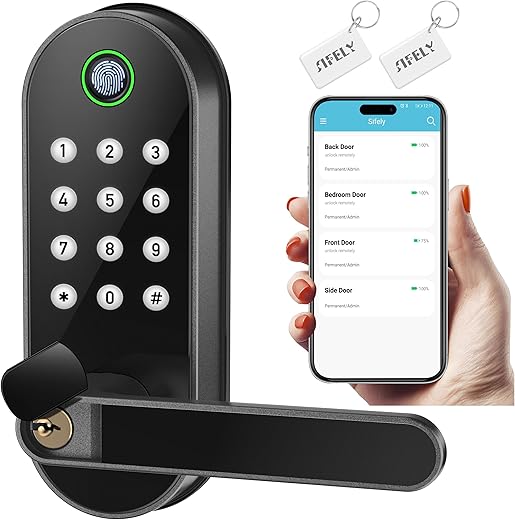
Sifely vs. Yamiry: Which Fingerprint Lock Reigns Supreme?
When it comes to securing our homes, fingerprint door locks have become an increasingly popular option. Today, I want to dive into a comparison between two noteworthy models: the Sifely Fingerprint Door Lock and the Yamiry Fingerprint Lock. Both promise convenience and enhanced security, but they each have unique features and functionalities that set them apart. By examining their design, performance, and user experience, I hope to shed light on which might be the better fit for your needs.
Secure Access
The Sifely Digital Electronic Lock offers homeowners and rental hosts a secure, convenient solution for keyless entry, featuring advanced 3D fingerprint technology for quick access in under 0.3 seconds. With easy installation and multiple unlocking methods, including passcodes and smartphone control, it’s perfect for both interior and exterior doors.
Keyless Security

The Yamiry Fingerprint Smart Lock offers a versatile 6-in-1 unlocking system, including fingerprint recognition and mobile app control, ensuring convenience and security for your front door. With easy DIY installation and robust access management features, it’s perfect for homeowners and property managers alike.
Sifely Fingerprint Door Lock
Unlocking Methods
Fingerprint, Passcode, Wireless Key Fob, Card, Smartphone, Remote Control
Lock Type
Door Handle, Deadbolt, Door Lever, Door Knob
Connectivity
Bluetooth, Wi-Fi
Installation Process
Easy installation with a Phillips screwdriver, no extra drilling needed
Recommended Uses
Short-term rental management, Home security, Convenient access control
Yamiry Fingerprint Lock
Unlocking Methods
Fingerprint, Passcode, Mechanical Key, Key Fob, App Control, Alexa Voice Unlock
Lock Type
Deadbolt
Connectivity
Bluetooth, Wi-Fi
Installation Process
Hassle-free installation in about 10 minutes, no additional drilling required
Recommended Uses
Ideal for landlords, property managers, Airbnb hosts, and self-housing residents
Sifely Fingerprint Door Lock
Yamiry Fingerprint Lock
Sifely Fingerprint Door Lock
Yamiry Fingerprint Lock
Comparison chart

Unique Selling Points (USPs)


Sifely Digital Electronic Lock
- Biometric Security: Utilizes fingerprint recognition for enhanced security.
- Versatile Use: Suitable for various types of doors, including bedrooms.
- Sleek Design: Attractive black finish complements modern décor.
Yamiry Fingerprint Smart Lock
- Remote Access: Control and manage your lock from anywhere using the app.
- Multiple Entry Options: Offers flexibility with three access methods.
- Customizable Passcodes: Ability to create unique codes for different users.
Similarities


- Both locks offer keyless entry through advanced technology.
- DIY installation is straightforward for both products.
- Each comes with a 1-year warranty for peace of mind.
Pros and Cons
Sifely Digital Electronic Lock
Pros:
- Reliable biometric security
- Great for diverse door applications
- User-friendly keypad for code entry
Cons:
- Lacks remote access capability
Yamiry Fingerprint Smart Lock
Pros:
- Remote management makes it very convenient
- Multiple access methods enhance flexibility
- Attractive design with modern appeal
Cons:
- Primarily designed for front doors, may not suit all interior needs
Use Cases
- Sifely Digital Electronic Lock: Ideal for homeowners looking for a reliable and stylish lock for various doors within their home.
- Yamiry Fingerprint Smart Lock: Perfect for tech-savvy users who want remote access and management for their front door security.
Conclusive Assessment
While both products have their unique strengths, the Yamiry Fingerprint Smart Lock emerges as a conditional winner for users who prioritize remote access and the flexibility of multiple entry methods. In contrast, the Sifely Digital Electronic Lock is a solid choice for users seeking a straightforward and reliable biometric lock for a variety of door types.
Final Summary
In conclusion, choosing the right smart door lock largely depends on your individual needs. If you value remote access and versatility, the Yamiry Fingerprint Smart Lock would be the best fit. However, if you prefer a biometric lock that works well across different doors without the need for app controls, the Sifely Digital Electronic Lock is a fantastic option. Both ensure enhanced security and ease of use, making them excellent additions to any home.
Guidelines for Comparing Smart Locks
When it comes to enhancing home security, smart locks are a popular choice. With various options like the Sifely Fingerprint Door Lock and Yamiry Fingerprint Lock, it’s essential to consider several key factors to make an informed decision. Below are general guidelines and critical details to help you compare smart locks effectively.
1. Security Features
- Locking Mechanism
- Check if the lock uses a deadbolt or a latch system for added security.
- Look for locks with anti-pick and anti-drill features.
- Access Methods
- Consider multiple access options: fingerprint, keypad, mobile app, or key.
- Evaluate the speed and reliability of fingerprint recognition.
2. Connectivity
- Smart Home Integration
- Ensure compatibility with your existing smart home ecosystem (e.g., Alexa, Google Home).
- Assess whether the lock supports Bluetooth, Wi-Fi, or Z-Wave connections.
- Remote Access
- Look for locks that allow remote locking/unlocking.
- Check if you can grant virtual access to guests through a mobile app.
3. Installation and Compatibility
- Ease of Installation
- Verify if the lock is DIY-friendly or requires professional installation.
- Check if it fits standard door sizes and types.
- Compatibility with Existing Hardware
- Make sure the smart lock can work with existing deadbolts or door knobs.
- Review if the lock is adjustable to fit various door thicknesses.
4. Battery Life and Power Options
- Battery Type and Life
- Check the type of batteries used (AA, lithium, etc.) and their lifespan.
- Consider locks with low-battery alerts and an emergency backup option.
- Power Backup Options
- Look for features like USB ports for emergency power.
- Assess whether the lock can be operated with a physical key as a backup.
5. App Features and User Experience
- Mobile App Functionality
- Review the user interface and ease of navigation.
- Check for features like access logs, notifications, and guest access management.
- User Reviews and Ratings
- Look for feedback on the app’s reliability and performance.
- Consider any common issues reported by users.
6. Design and Aesthetics
- Visual Appeal
- Consider the design and finish options available (e.g., black, silver, bronze).
- Ensure the lock matches your home décor and door style.
- Size and Bulkiness
- Evaluate the lock’s size to ensure it doesn’t interfere with door handles or other hardware.
7. Price and Warranty
- Price Comparison
- Compare the price points of the Sifely Fingerprint Lock and Yamiry Fingerprint Lock.
- Factor in the features offered at each price range.
- Warranty and Customer Support
- Look for locks with a solid warranty period and customer support options.
- Read reviews about the manufacturer’s responsiveness to issues.
Everything You Need to Know About Smart Locks
Sifely fingerprint locks have several key features that make them a popular choice for secure and convenient access. Here are some of the highlights:
- Keyless Entry: Both models offer keyless entry, which means I can unlock my door using just my fingerprint, passcode, or smartphone app, eliminating the need for traditional keys.
- Biometric Technology: The fingerprint recognition feature allows for quick and secure access. The locks can store multiple fingerprints, making it easy for family members or trusted guests to enter.
- Remote Access: With the smart door handle lock, I can generate and send temporary passcodes remotely through an app, which is super handy for visitors or service personnel.
- DIY Installation: Both locks are designed for easy installation, allowing me to set them up without needing a locksmith. This saves time and money!
- Versatile Use: The locks are suitable for various doors, whether it’s for exterior or interior use, such as entry, bedroom, or office doors.
- Durability and Security: Sifely locks are built to be robust and secure, often featuring advanced encryption and weather-resistant designs, ensuring they can withstand the elements.
These features combine to offer me a modern, reliable locking solution that enhances both security and convenience in my daily life.


About the Author: Oliver James


news via inbox
Stay updated with the latest tips and offers. Subscribe to our newsletter today!


I didn’t see much about battery life in the comparison. Can anyone share their experiences? I want a lock that won’t die on me! 😅
That’s a great point! Battery life is essential for smart locks. I’ll look into adding that info in the next update. Have you had issues with battery life in any locks before?
Honestly, I found the Yamiry Fingerprint Lock to be more user-friendly. The setup was a breeze! Has anyone else felt the same? 🤔
Interesting perspective! User-friendliness is key for many. What specific aspects of the Yamiry setup did you find easier?
I personally think both locks have their pros and cons. While Sifely has more features, the Yamiry is simpler. It really depends on what you need! Anyone else think that way? 🤷♂️
That’s a valid point! It really does come down to individual needs. What features do you think are essential for a smart lock?
Thank you for your feedback! It’s great to hear you found the Sifely Lock appealing. What features do you like the most about it?
What about comparing these locks with the August Smart Lock Pro or the Schlage Encode? They seem pretty popular too! 🤔
Those are excellent suggestions! We may consider adding them in future comparisons. Have you tried any of those locks yourself?
Thanks for the great comparison! I totally agree that the Sifely Fingerprint Lock seems to offer better features overall. It’s definitely my top pick! 🙌
Pro tip: Always check if the fingerprint lock can store multiple users for family access! Using smart locks can be a game changer for convenience. 🔑💡
Great tip! Multi-user access is definitely a crucial feature for many families. Have you had experience with both locks regarding this?