

NexiGo HelloCam vs. ELECOM UCAM-CF20FBBK: Webcam Face-Off
When it comes to choosing the right webcam for your needs, two popular options stand out: the NexiGo HelloCam Webcam and the ELECOM UCAM-CF20FBBK Webcam. Both devices offer unique features and capabilities that cater to a variety of users, from casual video callers to dedicated streamers. In this comparison, you’ll discover how these webcams stack up against each other in terms of performance, design, and usability, helping you make an informed decision based on your specific requirements.
Remote Meetings
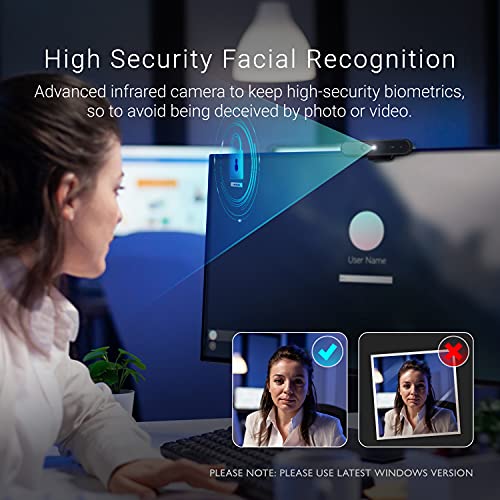
The NexiGo HelloCam is a 1080P webcam that offers seamless Windows Hello facial recognition for quick computer access and an automated privacy cover for added security. With features like automatic exposure and noise-canceling microphones, it ensures exceptional video and audio quality for all your video calls and streaming needs.
Secure Streaming

The ELECOM Facial Recognition Webcam offers seamless login with Windows Hello and captures stunning Full HD 1080P video at 30FPS, making it ideal for streaming and video calls. With its plug-and-play functionality and built-in noise-reducing microphone, you can enjoy crystal clear communication without the hassle of extra drivers.
NexiGo HelloCam Webcam
Resolution and Frame Rate
Full HD 1080p at 30fps
Facial Recognition Capability
Compatible with Windows Hello for Windows 10/11
Microphone Quality
Noise-canceling microphones for enhanced voice clarity
Privacy Features
Automated privacy cover that opens and closes with video calls
Dimensions and Weight
13.21 x 5.74 x 4.85 inches, 10.5 ounces
ELECOM UCAM-CF20FBBK Webcam
Resolution and Frame Rate
Full HD 1080p at 30fps
Facial Recognition Capability
Compatible with Windows Hello for Windows 10/11
Microphone Quality
Built-in microphone with echo and noise reduction technology
Privacy Features
No dedicated privacy cover feature mentioned
Dimensions and Weight
3.9 x 2.5 x 1 inches, 3 ounces
NexiGo HelloCam Webcam
ELECOM UCAM-CF20FBBK Webcam
NexiGo HelloCam Webcam
ELECOM UCAM-CF20FBBK Webcam
Side-by-side comparison

Unique Selling Points (USPs)


NexiGo HelloCam
- True Privacy with automatic electronic shutter.
- Facial enhancement features for improved image quality.
- Plug & Play setup, making it user-friendly.
ELECOM Facial Recognition Webcam
- Seamless Windows Hello integration for easy login.
- Designed for smooth streaming at 30 FPS.
- Aesthetic modern design suited for professional environments.
Similarities

- Both webcams offer 1080P resolution and 30 FPS performance.
- Compatible with Windows 10 and 11, ensuring wide usability.
- Each product features built-in microphones for clear audio.
Pros and Cons
NexiGo HelloCam
Pros:
- Enhanced facial recognition and image quality.
- Automatic shutter adds a layer of privacy.
- Affordable price point.
Cons:
- Limited streaming features compared to some competitors.
ELECOM Facial Recognition Webcam
Pros:
- Exceptional for secure logins with Windows Hello.
- Modern design fits well in a professional setup.
Cons:
- Lack of facial enhancement features.
- Higher price point may not appeal to budget-conscious buyers.
Use Cases
NexiGo HelloCam
- Ideal for casual users or those who prioritize privacy.
- Perfect for video calls, online classes, and general streaming.
ELECOM Facial Recognition Webcam
- Best suited for professionals needing secure access to their devices.
- Great for streaming content with a sleek appearance.
Conclusive Assessment
While both webcams excel in their respective areas, the NexiGo HelloCam emerges as a more versatile choice for casual users who value privacy and enhanced image quality. On the other hand, the ELECOM Facial Recognition Webcam stands out for its seamless integration with Windows Hello, making it ideal for professionals who prioritize security and aesthetics in a webcam.
Final Summary
In conclusion, if you are looking for an affordable, user-friendly webcam with great privacy features and facial enhancements, the NexiGo HelloCam is your best bet. However, if you prioritize secure login capabilities and a sleek design for professional use, the ELECOM Facial Recognition Webcam would be the better choice. Your final decision should consider your specific needs and how each product aligns with them!
Guidelines for Comparing Facial Recognition Cameras
When it comes to selecting a facial recognition camera, there are several factors to consider to ensure you make the best choice for your needs. This guide will help you outline the key elements to keep in mind while comparing products like the NexiGo HelloCam Webcam and ELECOM UCAM-CF20FBBK Webcam.
1. Image Quality
- Resolution: Look for cameras with high-resolution capabilities (e.g., 1080p or higher) for clear images.
- Low Light Performance: Consider how well the camera performs in low-light conditions.
- Frame Rate: A higher frame rate (e.g., 30fps or 60fps) ensures smoother video capture.
2. Facial Recognition Technology
- Accuracy: Research the technology used for facial recognition. Higher accuracy reduces false positives and negatives.
- Speed: How quickly can the camera recognize a face? Fast recognition is crucial for real-time applications.
- Integration: Check if the facial recognition feature can integrate with existing systems or software.
3. Connectivity Options
- Wired vs. Wireless: Determine whether you need a wired connection (USB) or if a wireless option (Wi-Fi/Bluetooth) suits your setup better.
- Compatibility: Ensure that the camera is compatible with your operating system and other devices.
4. Build Quality and Design
- Durability: Look for cameras that are built to last, especially if they will be used in different environments.
- Aesthetics: The design may matter if the camera will be visible in your workspace or home.
5. User Features
- Software: Consider the software that comes with the camera. User-friendly software with editing and management features can enhance your experience.
- Adjustable Settings: Look for options to adjust settings like brightness, contrast, and zoom for better control over the output.
- Privacy Features: Some cameras offer built-in privacy shields, which can be an essential feature for many users.
6. Price and Value
- Budget: Determine your budget range and find cameras that fit within it.
- Warranty and Support: Check for warranty length and the availability of customer support services. Strong support can be a great advantage.
7. Reviews and Recommendations
- User Feedback: Look for customer reviews to understand real-world performance and satisfaction.
- Expert Opinions: Consider professional reviews or comparisons to give you a comprehensive view of the product’s strengths and weaknesses.
Read also: Lorex 4K PoE Security Camera System Review


About the Author: Oliver James


news via inbox
Stay updated with the latest tips and offers. Subscribe to our newsletter today!


Hey, can anyone recommend which one is better for streaming? I need a solid webcam for my Twitch channel!
I recently used the ELECOM UCAM-CF20FBBK for a virtual job interview, and I was super impressed! The clarity was on point, and I felt more confident on camera.
That’s awesome to hear! The ELECOM is known for its sharp video quality, so it sounds like it performed well for you!
Could you compare these with the Logitech C920? I’m curious how they stack up!
Great suggestion! The Logitech C920 is a solid webcam, and we can definitely consider it for a future comparison.
I’m totally team NexiGo! I love the 1080p quality and the built-in ring light. Made a huge difference in my Zoom calls!
Glad to hear you’re enjoying the NexiGo! The ring light feature is definitely a game changer for better lighting!
Thanks for the comparison! I was on the fence, but now I feel more informed. Keep up the great work!
You’re welcome! I appreciate your support and am glad you found the comparison helpful!
This comparison is super helpful! I didn’t know about the differences until now. I think I’ll go with the NexiGo for my online classes!
Happy to help! The NexiGo is definitely a popular choice for online classes due to its user-friendly features.
Both are great options for streaming, but the NexiGo HelloCam has some additional features like better low-light performance which might be beneficial for your needs!
I recently got a Razer Kiyo, and it’s been awesome for lighting and clarity! Highly recommend it if you’re looking for alternatives.
Thanks for the recommendation! The Razer Kiyo is indeed a popular choice for streamers and gamers thanks to its built-in ring light.