

Setting Up Indoor Security Cameras
Did you know that a burglary occurs every 26 seconds in the U.S.? That’s a staggering statistic that can leave anyone feeling a little anxious about home safety. I completely understand the worry that comes with wanting to protect your loved ones and belongings. With indoor security cameras, you can take proactive steps to create a safer environment, allowing you to feel more at ease in your own home. In this blog post, I’ll walk you through the essential steps for setting up indoor security cameras effectively—covering everything from selecting the right devices to strategic placement and usage tips. Let’s dive in and take that first step towards peace of mind!


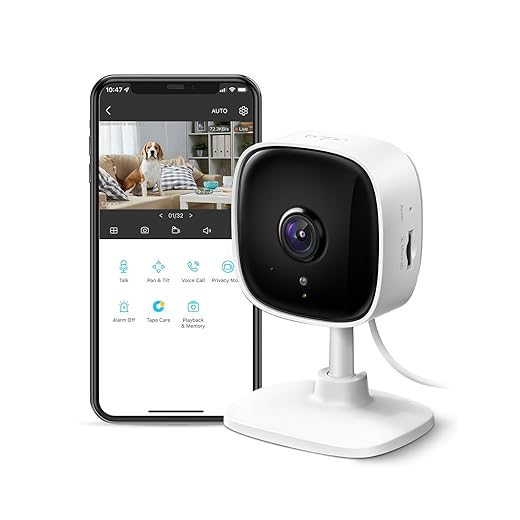
Choosing the Right Indoor Security Cameras
Selecting the right indoor security camera is essential for ensuring your home or business is well-protected. With so many options available, understanding the different types of cameras, their features, and how they fit into your budget can be overwhelming. Let’s break it down to simplify your decision-making process.
Types of Indoor Security Cameras
When it comes to indoor security cameras, you’ll typically find two main types: wired and wireless. Each has its own pros and cons, making it important to assess which best fits your situation.
Wired Cameras
- Pros: Generally more reliable for continuous recording since they don’t rely on Wi-Fi signals. They can provide higher video quality due to stable connections.
- Cons: Installation can be more complicated and may require professional help. They can be less flexible regarding placement since they need to be near power outlets.
Example: The Amcrest 4MP Wired Indoor Camera offers 4MP video resolution and is perfect for those who prefer a more permanent solution.
Wireless Cameras
- Pros: Easier to install and can be placed virtually anywhere within range of your Wi-Fi network. Most have built-in batteries, making them portable.
- Cons: They can be vulnerable to interference from other wireless devices and may require regular charging.
Example: The Ring Indoor Cam is a popular choice for those looking for wireless convenience. It’s compact, easy to set up, and integrates well with the Ring ecosystem.
Key Features to Consider
When evaluating indoor security cameras, consider the following features to ensure you get the best fit for your needs:
Motion Detection
Cameras with motion detection can alert you when movement is detected, providing added security and peace of mind.
- Example: The Nest Cam Indoor features intelligent alerts that can differentiate between people and pets, so you’re only notified when it truly matters.
Night Vision
Having night vision capabilities ensures you can monitor your space even in low-light conditions.
- Example: The Logitech Circle 2 offers excellent night vision, making it a great choice for those who want 24/7 surveillance.
Audio Capabilities
Two-way audio allows you to listen in and communicate through the camera, which can be particularly useful for monitoring kids or pets.
- Example: The Wyze Cam Pan not only features two-way audio but also allows you to pan and tilt the camera for a wider view of the room.
Budget Considerations
Security cameras come in a wide range of prices, so it’s important to determine how much you’re willing to spend without sacrificing essential features. Here’s a quick reference table to help you visualize options based on price range:
| Price Range | Features Available | Example Product |
|---|---|---|
| Under $50 | Basic video quality, manual recording | Wyze Cam v3 |
| $50 – $150 | HD video, motion detection, two-way audio | Ring Indoor Cam |
| $150 – $300 | 4K video, night vision, smart home integration | Nest Cam Indoor (Wired) |
| Over $300 | Advanced features, cloud storage, higher resolution | Arlo Ultra 2 |
Making the Right Choice
To choose the perfect indoor security camera, ask yourself the following questions:
- What is the primary purpose of the camera? (e.g., monitoring pets, security when away, etc.)
- Do I need a wired or wireless solution?
- What features are non-negotiable for me? (e.g., night vision, audio, etc.)
- What is my budget?
By answering these questions and considering the options and examples provided, you can confidently select the indoor security camera that meets your specific needs. Happy camera shopping!
Planning Camera Placement
Proper placement of security cameras is essential to maximize their effectiveness. When considering where to install your cameras, it’s important to think strategically about the layout of your property. This section will cover key areas for camera installation and factors to consider for optimal coverage.
Key Locations for Camera Installation
- Entry Points
- Front Door: This is often the first place intruders will try to access your home. Position a camera, like the Ring Video Doorbell Pro 2, at eye level to capture clear images of anyone approaching.
- Back Door: Similar to the front door, the back entrance is a common vulnerable spot. A camera such as the Arlo Pro 4 provides high-definition video and is weather-resistant, making it a great option for outdoor use.
- Common Areas
- Living Room: If your living space is large, consider placing a camera like the Nest Cam (Indoor, Wired) in a corner to monitor the area. This way, you can keep an eye on the room without being intrusive.
- Garage: Garages can house valuable items and are often overlooked. Installing a camera like the Lorex 4K Ultra HD Security Camera can provide excellent coverage and clarity.
- Vulnerable Spots
- Windows: Ensure that windows, especially those on the ground floor, are monitored. A discreet camera like the Blink Indoor can easily be mounted near windows to catch any suspicious movements.
- Driveway: Installing a camera such as the Wyze Cam v3 facing your driveway helps monitor vehicles coming and going. Its night vision capabilities ensure you’re covered even in low light conditions.
Factors to Consider for Optimal Coverage
Camera Angles
- Field of View: Choose cameras with a wide field of view, such as the Reolink Argus 3 Pro, which offers a 122-degree viewing angle. This ensures you capture more area with fewer cameras.
- Direction: Always aim cameras to cover pathways and critical areas like doorways and parking areas. Avoid pointing cameras directly at bright lights or reflective surfaces to reduce glare.
Height
- Installation Height: Cameras should be installed at a height of 8 to 10 feet for optimal viewing without being easily tampered with. For example, the Eufy Security 2K Indoor Cam can be mounted on walls to achieve the right height without obstructing the view.
- Tilt and Pan: Models like the Amcrest 4MP PTZ Camera offer pan and tilt features, giving you flexibility in monitoring large areas from a fixed position.
Avoiding Blind Spots
- Overlap Coverage: When installing multiple cameras, ensure their field of views overlap slightly. This prevents blind spots and ensures comprehensive coverage. A great option for this is the Swann 6 Camera 4K Security System, which allows for the placement of multiple cameras with significant overlap.
- Regular Checks: Walk around your property and check the camera feeds to identify any potential blind spots. Adjust placement as needed to ensure complete coverage.
Practical Examples of Camera Placement
Here’s a quick comparison table of recommended cameras for different locations:
| Location | Camera Model | Key Features | Price Range |
|---|---|---|---|
| Front Door | Ring Video Doorbell Pro 2 | HD Video, Motion Detection | $249.99 |
| Back Door | Arlo Pro 4 | 2K Video, Color Night Vision | $199.99 |
| Living Room | Nest Cam (Indoor, Wired) | HD Video, Two-Way Audio | $129.99 |
| Garage | Lorex 4K Ultra HD Security Camera | 4K Video, Weather Resistant | $199.99 |
| Windows | Blink Indoor | HD Video, Alexa Compatible | $79.99 |
| Driveway | Wyze Cam v3 | 1080p Video, Night Vision | $35.00 |
| Multiple Cameras | Swann 6 Camera 4K Security System | 4K Video, 1TB Hard Drive Included | $499.99 |
By strategically planning your camera placements and considering factors like angles, height, and potential blind spots, you’ll significantly enhance the effectiveness of your security system. Happy securing!
Final Thoughts on Enhancing Your Home’s Safety
In conclusion, I’ve found that setting up indoor security cameras can truly elevate your home security. By selecting the right devices, planning their placement carefully, following installation guidelines, and keeping up with regular maintenance, you can create a safer space for yourself and your loved ones. Remember to consider your unique needs and budget to make the best choice for your home. Stay secure!


About the Author: Oliver James


news via inbox
Stay updated with the latest tips and offers. Subscribe to our newsletter today!



I think there should be more emphasis on privacy concerns. It’s a bit creepy having cameras indoors, especially in private spaces like bedrooms. What do you all think?
That’s a valid concern! Privacy is definitely a hot topic when it comes to indoor cameras. It’s important to find a balance between security and comfort, and always be aware of where cameras are placed.
What about battery-operated cameras? Do they compromise on quality? Curious if anyone has had good experiences with them.
Battery-operated cameras can be hit or miss, but models like the Arlo Go are pretty solid! They offer flexibility in placement, but keep an eye on battery life. Appreciate you bringing this up!
Don’t forget about the potential pain points with Wi-Fi connectivity! I had issues with my Arlo camera dropping connection. Super frustrating!
Absolutely! Connectivity can be a huge headache. Make sure to place your cameras within a good range of your router, or consider using Wi-Fi extenders if that’s a persistent issue. Thanks for pointing this out!
Thanks for sharing your experience! The Ring Indoor Cam is definitely user-friendly, but I hear you on the night vision. It’s something many users have pointed out. Have you tried adjusting the settings? Sometimes that can help a bit!
I’d love to know more about integrating cameras with smart home systems! I have a Google Nest Hub and it’d be awesome if my cameras could sync with it.
Great point! Many cameras like the Nest Cam and Ring also have smart home integrations. I will consider adding a section on that in future articles. Thanks for the suggestion!
Do you have any recommendations for further reading? I want to dive deeper into camera features and security protocols.
Definitely! I’d recommend checking out articles on security camera reviews on sites like CNET or TechRadar. They offer detailed comparisons and insights on features. Happy reading!
Great tips on choosing the right cameras! I recently got the Ring Indoor Cam, and it’s super easy to set up. Just wish it had a bit better night vision, though!
I’m kind of torn between indoor and outdoor cameras. Are indoor cameras really necessary if you have outdoor ones? Let’s debate!
That’s an interesting conversation! While outdoor cameras are great for perimeter security, indoor cameras can help monitor activity inside your home, especially when you’re away. Both serve different but important purposes!